
Every worker in the UAE faces one question sooner or later. How to check the work visa status? Whether new to the country or a long-time resident, knowing the visa status brings peace of mind. A work visa is the most important document for any employee. It allows legal stay, legal work, and access to services like banking and healthcare. Without a valid visa, nothing else works. Many people wait until something goes wrong. A travel plan gets cancelled. A bank account gets frozen. A sponsor sends bad news. That is the worst time to check. The right time is now. And the good news is that checking is simple, fast, and completely free. This guide walks through every working method in plain language. No fluff. No confusing terms. Just step-by-step instructions that work. Follow any of the three methods below, and the visa status will appear on screen within seconds.
A quick look at the visa status prevents many headaches.
Nobody wants to find out at the airport that the visa expired three months ago. A simple check once a month stops that from ever happening.
The UAE government updated a few things recently.
Important updates for 2025–2026:
Any website asking for money to perform a visa status check is fake. The real service is 100% free on government platforms.
This works for Abu Dhabi, Sharjah, Ajman, Umm Al Quwain, Ras Al Khaimah, and Fujairah.
Step by step:
What shows up on screen:
| Field | What It Means |
| Visa status | Valid, expired, or under processing |
| Expiry date | Last day the visa works |
| Visa type | Employment, residency, or other |
| Sponsor name | Who holds the visa file |
The ICP method takes less than 60 seconds when done correctly.
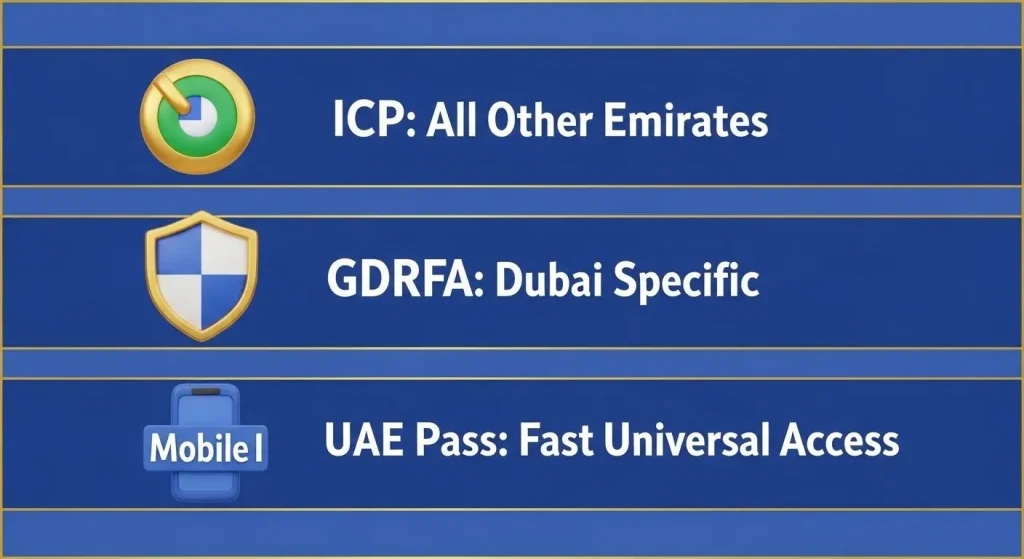
Dubai work visas do not appear on ICP. This is the most common mistake people make.
Correct steps for Dubai:
Why GDRFA is different:
Trying a Dubai visa on ICP returns no record found. Always use GDRFA for Dubai.
This method requires one-time registration. After that, checking takes under ten seconds.
How to set it up:
Why people prefer the UAE Pass:
For frequent checks, nothing beats UAE Pass.
After checking, one of these results appears.
The visa is legal. Work and stay permitted. Check the expiry date and remember it.
Visa passed the end date. The grace period is 30 days. After that, fines start at 50 AED per day.
Immigration is still reviewing the application. No action needed. Wait one week and check again.
My work contract ended. Another 30 days to leave the country or find a new sponsor. No fines during this window.
Rare status. Means something is wrong with the file. Visit the immigration office directly. Cannot fix this online.
Sometimes the portal shows nothing. Here is why.
Wrong portal used
Fix: Use ICP for all emirates except Dubai. Use GDRFA only for Dubai.
The Passport number was typed wrong
One wrong digit breaks the entire search. Double check before clicking search.
New visa not in the system yet
Freshly issued visas take up to 48 hours to appear. Check again after two days.
Nationality selection error
Some nationalities have multiple spellings in the dropdown. Pick the one matching the passport exactly.
Technical maintenance
Government portals update on Friday nights sometimes. Try again in a few hours.
Each status requires a different action.
If suspended:
Many wrong beliefs float around about visa status checks.
Myth 1: Checking alerts the sponsor
False. The sponsor never receives any notification.
Myth 2: Paid services work better
False. Government portals are free and instant. Paid sites just repackage the same data.
Myth 3: Typing centers must do the check
False. Anyone with a phone and internet can do it.
Myth 4: A cancelled visa still allows work
False. Absolutely false. Working on a cancelled visa is illegal.
Myth 5: The application number is required
False. Passport number and nationality are enough.
Q1: Can a visa be checked without an Emirates ID?
Yes, the passport number alone works on all portals.
Q2: Does checking cost money?
No. Completely free on all government platforms.
Q3: How often can someone check?
As many times as needed. No limit exists.
Q4: What does “no record found” mean?
Either the visa has not been issued yet, or the passport number is wrong.
Q5: Does the UAE Pass work for all nationalities?
Yes. Any resident with a valid visa can register.
Q6: Does checking fix an expired visa?
No. Checking only shows the status. Renewal must go through the sponsor.
Checking a UAE work visa status is quick, free, and easy.
Three working methods exist:
No payment. No agent & No appointment. Just a passport number and one minute. Bookmark the official portals. Download UAE Pass. Set a monthly reminder to check. That small habit saves thousands in fines and prevents legal trouble.